PLC System Integration: Seamlessly Integrating ABB PLCs with Existing Control Systems and HMIs
Learn how to integrate ABB PLCs with legacy control systems and HMIs. Expert tips for Indian automation engineers on system upgrades, technical consultation, and reliable component supply.
Introduction
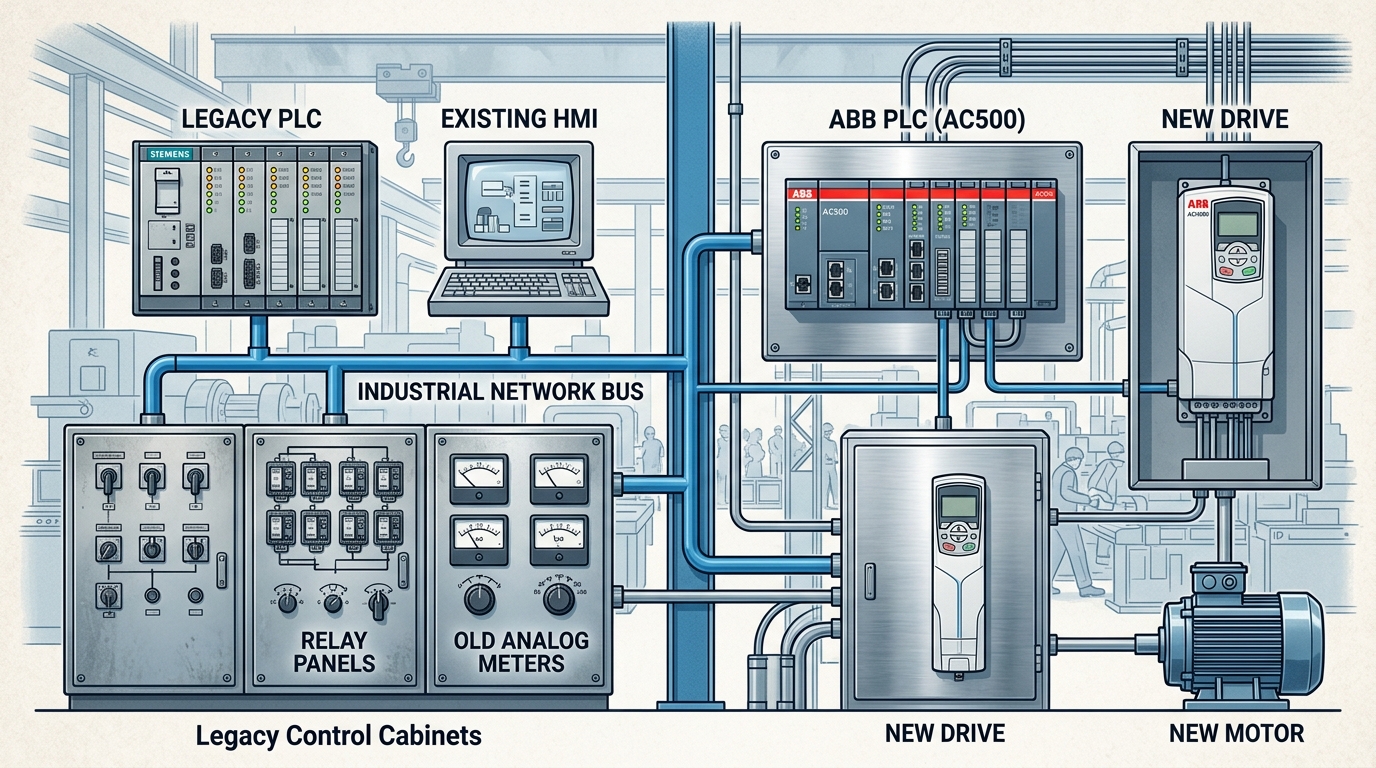
Automation engineers across Indian manufacturing plants face a common challenge: how to modernize control systems without replacing every component. PLC system integration is the key to bridging legacy equipment with next-generation technology. Whether you're upgrading a 15-year-old relay-based line or connecting a new ABB AC500 PLC to an existing Profibus network, a methodical approach saves time, reduces downtime, and ensures long-term reliability. This guide walks you through the critical steps, tools, and best practices for integrating ABB PLCs with existing control systems and HMI interfaces—backed by practical advice from Digital Controls, your trusted partner in industrial automation.
Understanding the Challenges of PLC System Integration in Indian Manufacturing
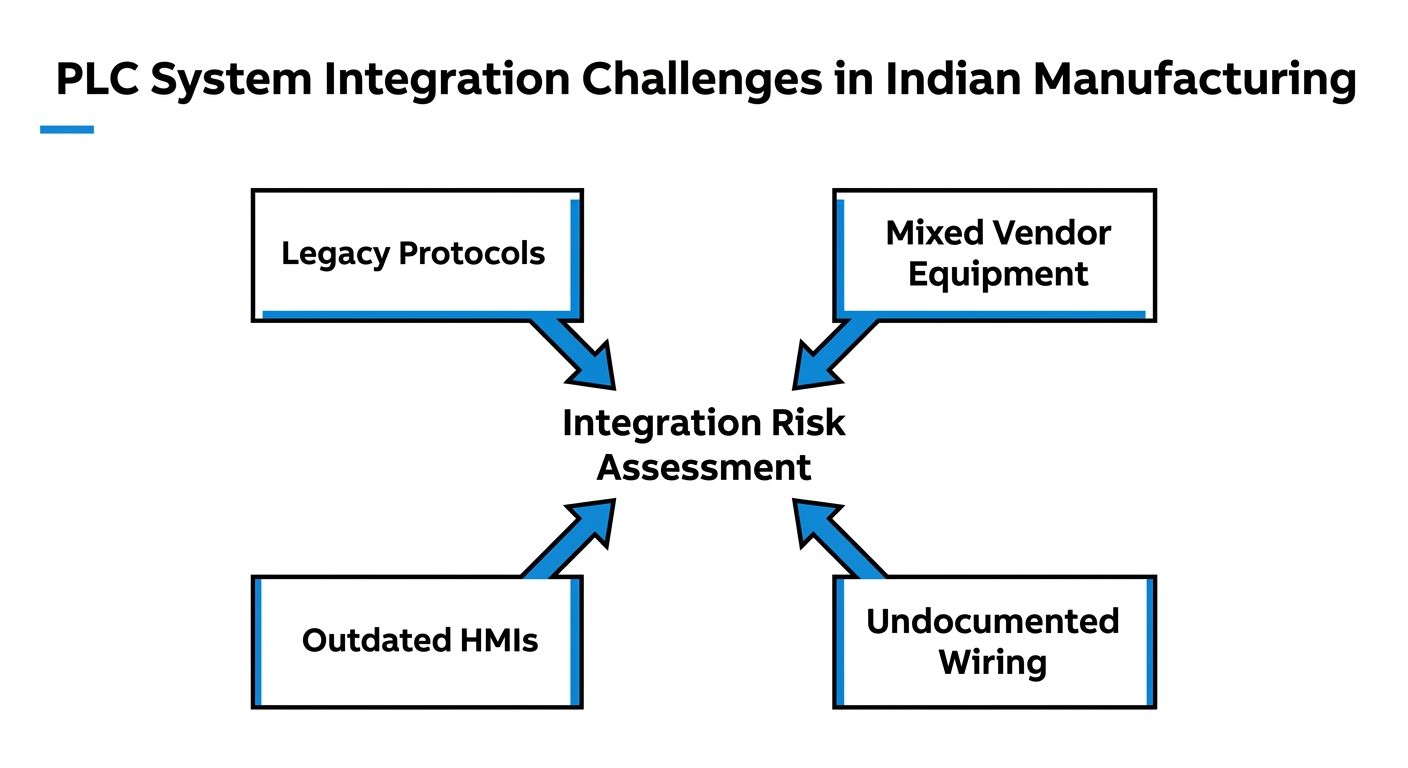
Integrating a new PLC into an existing plant floor is rarely plug-and-play. Indian facilities often have a mix of vendors, communication protocols, and age-diverse equipment. Common pain points include:
- Legacy systems with proprietary protocols (e.g., Siemens S7, Allen-Bradley DH+)
- Mixed fieldbus environments – Modbus RTU, Profibus DP, Ethernet/IP, and CANopen coexisting on one network
- Outdated HMI panels that cannot communicate directly with modern PLCs
- Non-standard wiring and undocumented control panels
Addressing these issues upfront is essential for successful PLC system integration. A thorough audit of existing hardware and network topology prevents costly surprises during commissioning.
Key Communication Protocols to Consider
ABB PLCs natively support a wide range of industrial protocols, making them flexible for integration:
- Modbus TCP/RTU – universal and widely used in Indian industries
- PROFIBUS DP – common in older European-origin machinery
- Ethernet/IP – standard in North American segments, now growing in India
- CANopen – popular in motion control and drives
- OPC UA – for IT/OT convergence and cloud connectivity
Selecting the right communication module for your ABB PLC (e.g., AC500-eCo, AC500-S) ensures seamless data exchange with existing devices.
Why Choose ABB PLCs for System Upgrades?
ABB’s PLC portfolio—especially the AC500 and AC500-S series—offers several advantages for integration projects:
- Scalable hardware from compact to high-performance controllers
- Built-in multi-protocol support (no extra gateways in most cases)
- Cybersecurity features (secure boot, access control, encrypted communication)
- Integrated safety (AC500-S with SIL certification)
- Tight ecosystem with ABB drives, motors, and HMIs
When planning a system upgrade, standardizing on ABB reduces compatibility headaches. As one of India’s premier suppliers, Digital Controls provides technical consultation to match the right PLC to your project’s scope PLCs.
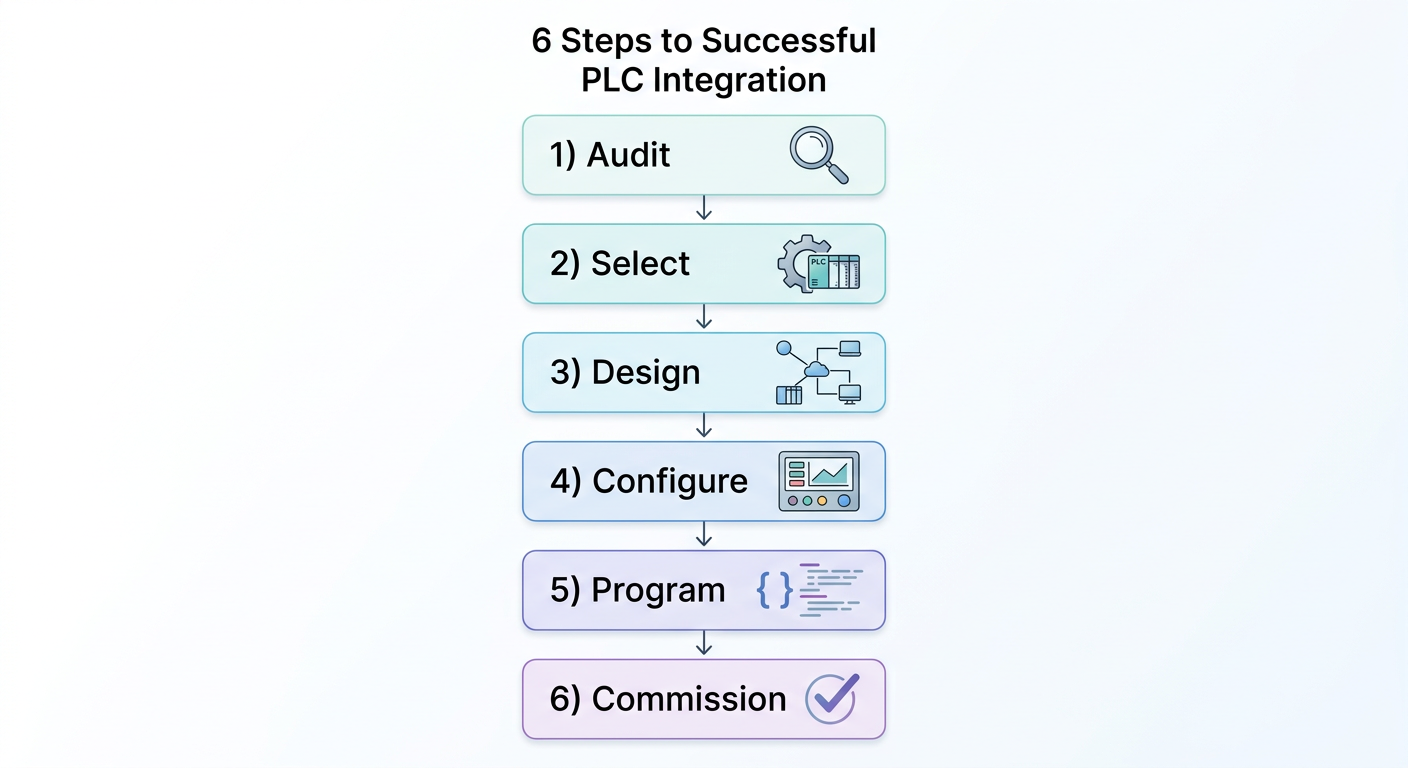
Key Steps for Successful PLC System Integration
Follow this structured approach to minimize risk and maximize performance.
Step 1: Audit Your Existing Control Infrastructure
Begin by documenting every controller, HMI, drive, sensor, and actuator. Note:
- Model numbers and firmware versions
- Communication protocol and baud rate settings
- Network topology (daisy chain, star, ring)
- Power supply and grounding details
Use a Fluke network tester (e.g., Fluke Networks MicroScanner) to verify cable integrity and identify wiring faults. This upfront investment pays off during later stages.
Step 2: Select the Right ABB PLC and Communication Modules
Based on the audit, choose a PLC with sufficient I/O count and the required communication interfaces. For example:
- AC500-eCo – for simple, standalone machines
- AC500-S – for safety-critical applications
- AC500 with extension modules – to add Profibus, Ethernet/IP, or CANopen interfaces
Digital Controls offers a full range of ABB PLCs and can help match modules to your existing protocol mix Services.
Step 3: Design the Network Architecture
Create a clear network diagram showing all nodes, gateways, and data flows. Key considerations:
- Segment legacy networks from new ones using routers or protocol converters
- Use industrial switches (e.g., ABB EKI series) for Ethernet-based systems
- Plan for future expansion – leave spare IP addresses and bandwidth
Step 4: Configure HMI Interfaces
ABB’s CP600 series HMI panels simplify integration with their built-in drivers for multiple PLC brands. If your existing HMI cannot communicate directly with the new ABB PLC, consider a gateway or upgrading to an ABB panel. Programming is done via Panel Builder 600, which supports third-party tags via OPC DA/UA.
Step 5: Programming and Testing with Automation Builder
ABB’s integrated engineering tool, Automation Builder, covers PLC programming (IEC 61131-3), drive configuration, and HMI design in one environment. Use it to:
- Develop logic in Ladder, FBD, ST, or SFC
- Simulate the control program offline
- Validate communication with virtual drives
- Perform factory acceptance testing (FAT) before site installation
Step 6: Commissioning and Troubleshooting
On-site, follow a phased startup:
- Power up the new PLC and verify basic I/O
- Check communication with each existing device (ping, read diagnostic registers)
- Transfer control from old to new system gradually
- Monitor motor currents, drive status, and HMI response using Fluke 438-II Power Quality Analyzer or Fluke 1777 Three-Phase Power Quality Logger for energy baselines
Common issues include baud rate mismatches, network terminator resistors missing, and IP address conflicts. A systematic checklist keeps commissioning on schedule.
Integrating ABB PLCs with VFDs and Motors
ABB drives (ACS180/380/580/880 series) and motors are designed for seamless PLC integration via fieldbus. Directly connecting a PLC to a drive over Ethernet/IP or Modbus TCP allows:
- Real-time speed and torque control
- Status monitoring (faults, load, temperature)
- Energy optimization using EnergySave packages
When using SynRM (synchronous reluctance) motors, the drive and PLC can coordinate to maximize efficiency up to IE5 levels. Digital Controls supplies complete drive-motor-PLC packages and provides application-specific selection support Ac Drives.
Leveraging Digital Tools for Faster Integration
Modern digital tools accelerate PLC system integration and reduce errors:
- ABB Drive & Motor Selector – web-based tool that replaces manual catalog browsing; engineers input application parameters (torque, speed, duty cycle) and receive a matched drive-motor-PLC combination.
- Automation Builder – not just for programming; includes project documentation, library management, and version control.
- ABB Ability™ – cloud platform for remote monitoring and predictive maintenance, integrating with PLC data via OPC UA.
Using these tools, engineers at Indian facilities can shorten project timelines by 20–30% compared to traditional manual methods.
Ensuring Long-Term Reliability: Testing with Fluke Instruments
After integration, ongoing reliability depends on proper testing during commissioning and maintenance. Fluke instruments are indispensable for:
- Verifying power quality – detect harmonics, dips, swells that affect PLC/drive performance
- Measuring motor insulation – Fluke 1587 FC insulation tester
- Calibrating process loops – Fluke 754 documenting process calibrator
- Troubleshooting network cabling – Fluke Networks LinkIQ
Digital Controls offers a complete range of Fluke equipment and can advise on the right toolkit for your plant Fluke.
FAQ
What is PLC system integration?
PLC system integration is the process of connecting a programmable logic controller (PLC) with existing control devices (sensors, actuators, drives, HMIs) and higher-level systems (SCADA, MES) to create a unified automation solution. It involves hardware selection, network configuration, programming, and commissioning.
How do I integrate an ABB PLC with an existing Modbus network?
Most ABB PLCs (e.g., AC500) have built-in Modbus TCP/RTU ports. If your legacy network uses Modbus RTU, you may need an RS232/485 converter. Use the PLC’s communication configuration tool within Automation Builder to set baud rate, parity, and slave IDs. Test with a Modbus scanner before going live.
What are common challenges in PLC integration?
Challenges include protocol mismatches, undefined network topologies, legacy HMI limitations, power quality issues causing communication errors, and lack of documentation. A thorough site audit and use of Fluke diagnostic tools can preempt most problems.
Why choose Digital Controls for PLC system integration support?
Digital Controls provides end-to-end technical consultation, ABB component supply, control panel design, and commissioning support. Our team understands Indian industrial environments and can source genuine ABB PLCs, drives, motors, and Fluke instruments under one roof Services.
Conclusion
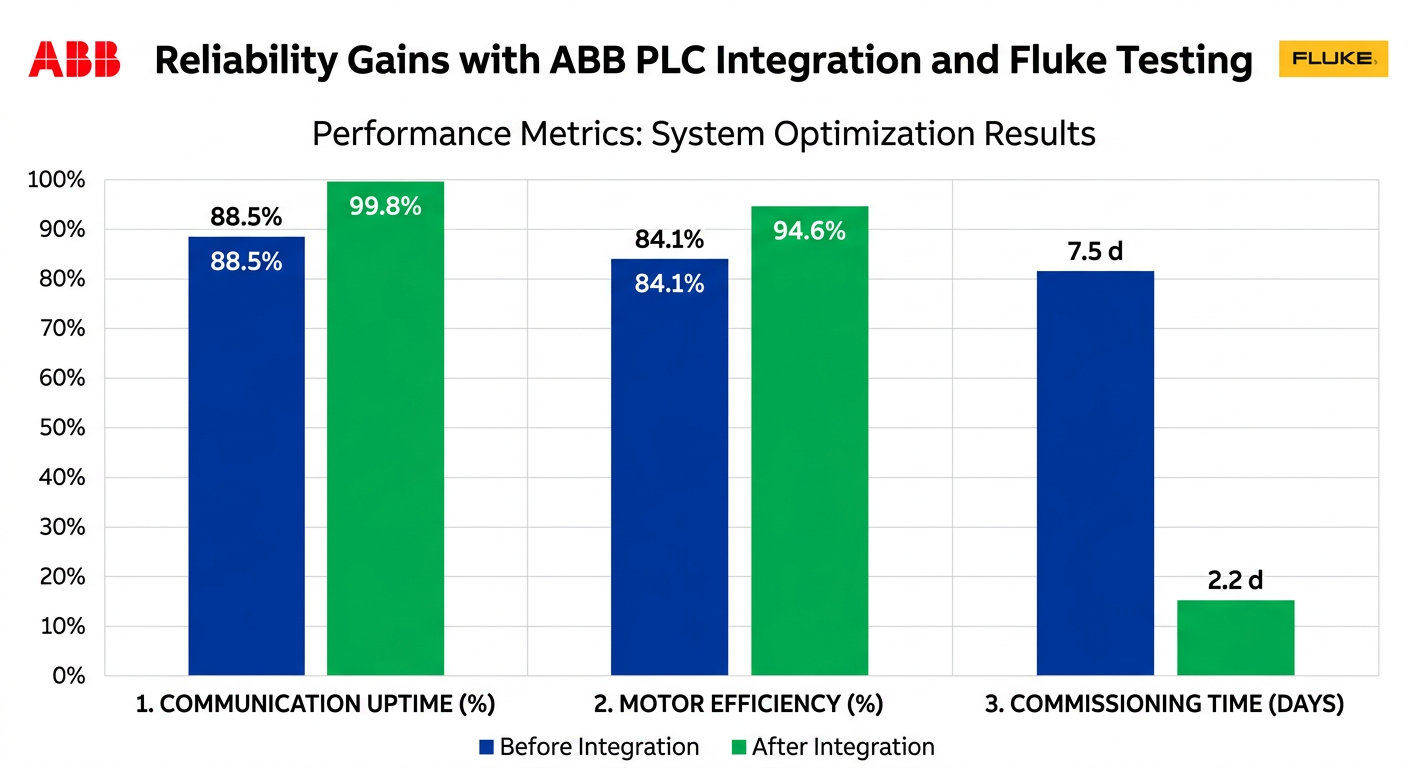
Successful PLC system integration requires more than just connecting wires—it demands a strategic approach that respects existing infrastructure while embracing modern capabilities. By following the steps outlined in this guide—auditing your plant, selecting the right ABB PLC, designing the network, configuring HMIs, and thoroughly testing with Fluke instruments—you can achieve a smooth upgrade with minimal downtime.
At Digital Controls, we combine deep ABB product expertise with hands-on commissioning experience to support automation engineers across India. Whether you need a single PLC module or a complete control panel with drives and motors, we’re here to help.
Ready to start your PLC system integration project? Contact our technical team for a free application review and component recommendation. Submit your enquiry today.