What Causes Drive Overcurrent Faults? A Diagnostic Guide for VFD Engineers
Diagnose and prevent overcurrent faults in ABB/Fluke VFDs. Detailed guide for Indian engineers on causes, troubleshooting, and solutions—with drive replacement support from Digital Controls.
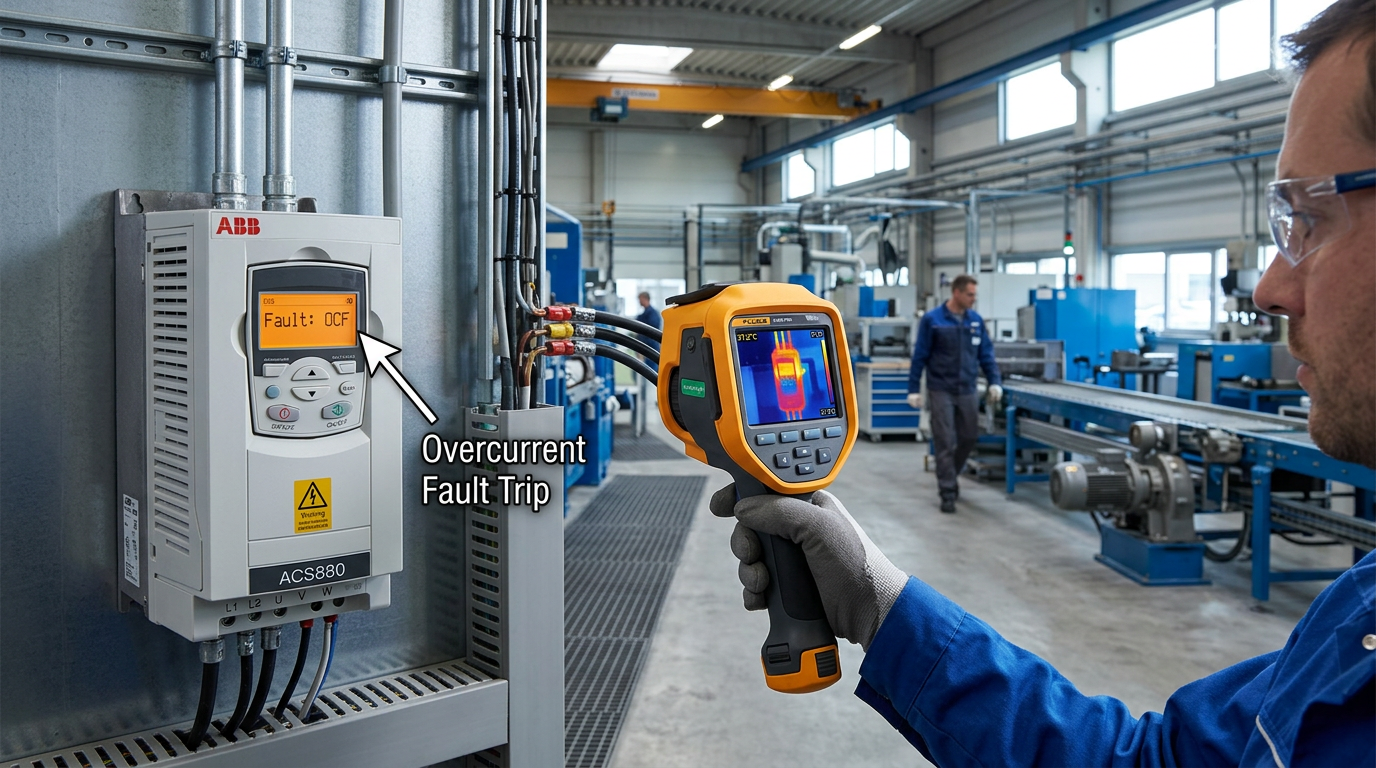
If you manage industrial drives in Indian manufacturing plants, you’ve likely seen an OCF (overcurrent fault) flash on your ABB ACS580 or Fluke handheld tester display. These faults stop production, waste troubleshooting hours, and often lead to unnecessary drive replacements when the real cause is mechanical or parametric.
In this guide, we break down what causes drive overcurrent faults in VFDs, how to distinguish between electrical, mechanical, and configuration root causes, and what you can do to prevent them. We’ll also show how Digital Controls can support your team with replacement drives, application reviews, and control panel coordination when faults persist.
Understanding Overcurrent Protection in VFDs
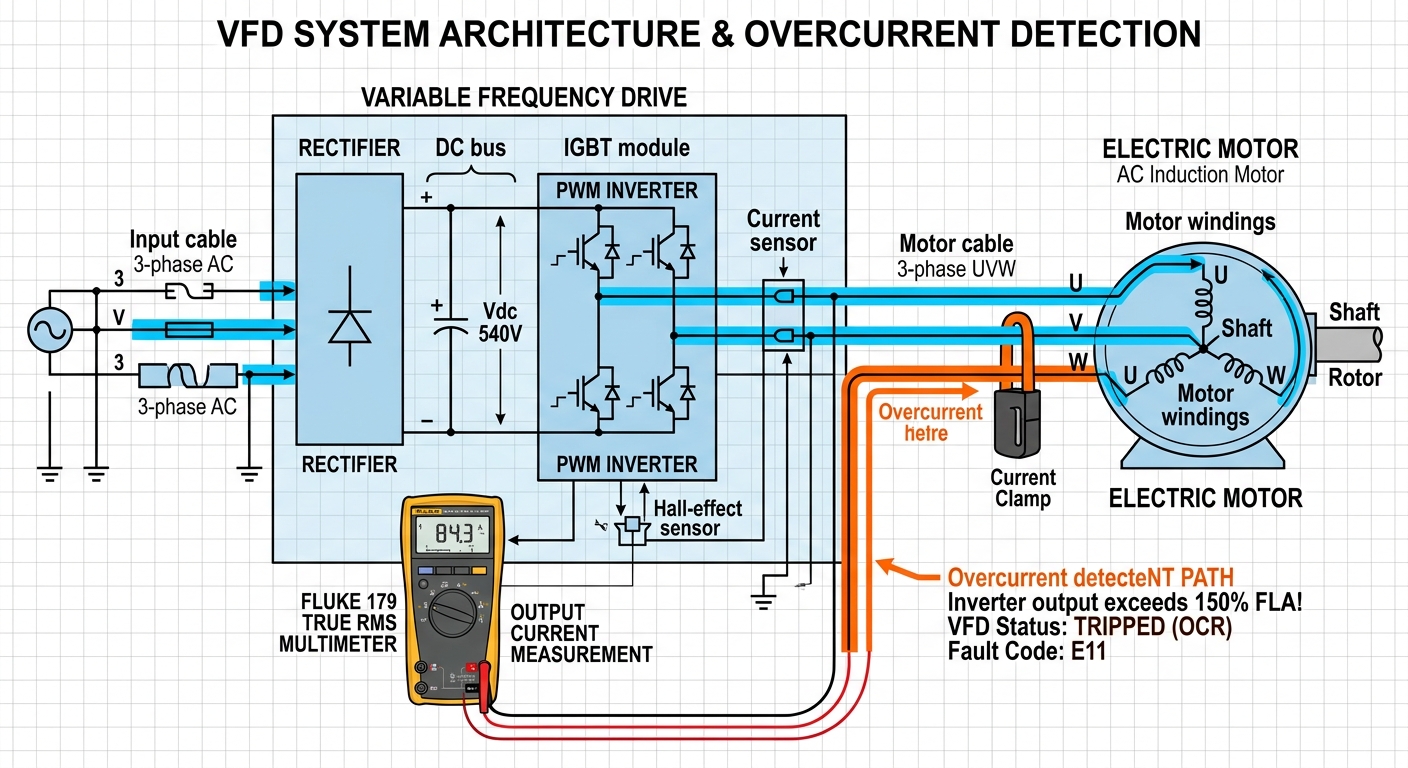
Overcurrent protection is a built-in safety feature in every modern variable frequency drive. When the output current exceeds a predefined threshold (typically 150–200% of rated current for short bursts, or 110% continuously), the drive trips to prevent IGBT damage, motor winding burn, or cable meltdown.
How Drives Detect Overcurrent
- Instantaneous trip: Detects a rapid current spike (e.g., short circuit or ground fault) within microseconds.
- Thermal overload: Integrates current over time; protects against prolonged overloading.
- I²t monitoring: Uses the motor’s thermal model to mimic temperature rise.
Understanding the trip type from the drive’s log is the first step in diagnosis. ABB’s assistant control panel (ACH-AP-H) displays specific fault codes that narrow down the cause.
7 Common Causes of Drive Overcurrent Faults
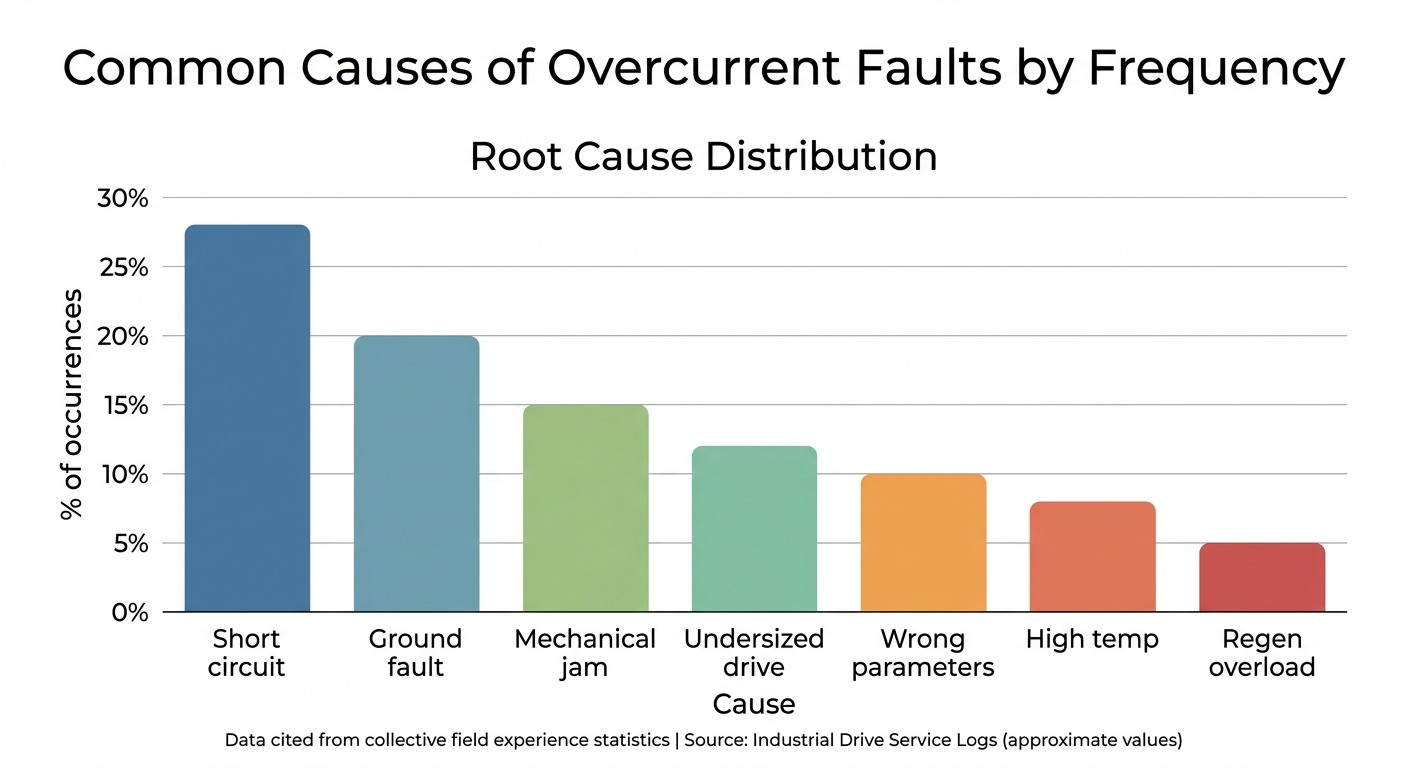
Let’s examine the typical culprits, from most frequent to rare but serious.
1. Short Circuit or Ground Fault in the Motor Cable
A damaged cable, moisture ingress in a junction box, or loose terminal can create a direct phase-to-phase or phase-to-ground path. The drive sees extremely high current and trips instantly.
Diagnosis: Use a Fluke 1550C insulation tester to measure insulation resistance between phases and to ground. For ABB drives, the fault code often reads "SHORT CIRCUIT" or "GROUND FAULT."
Prevention: Regular cable inspection, proper glanding, and using screened cables.
2. Motor Winding Insulation Breakdown
Aging motors, moisture, or voltage spikes from fast-switching IGBTs can degrade winding insulation, causing partial or full short circuits.
Diagnosis: Perform a surge test or polarization index test. Compare phase-to-phase resistance using a multimeter.
Solution: Rewind or replace the motor. Consider using a three-phase induction motor rated for inverter duty.
3. Mechanical Blockage or Load Jamming
A seized bearing, clogged pump impeller, or jammed conveyor can lock the motor rotor. The drive tries to accelerate against a dead stop, drawing massive current.
Diagnosis: Check the driven equipment manually. Use a Fluke 438-II power quality analyzer to capture current waveform during start-up.
Solution: Clear the blockage, lubricate bearings, or install a torque limiter. Adjust the drive’s start-up ramp time.
4. Incorrect Drive Sizing (Undersized for Load)
If the motor’s constant torque requirement exceeds the drive’s rated output, especially at low speeds, the drive may trip during acceleration or heavy loading.
Diagnosis: Compare motor nameplate FLA (full load amps) with drive’s continuous current rating. Factor in heavy duty (HD) vs normal duty (ND) application.
Prevention: Use ABB’s web-based drive and motor selector tool for correct sizing. Consider ABB ACS880 series for demanding constant-torque applications.
5. Improper V/F or Vector Control Parameters
Wrong motor parameters (stator resistance, leakage inductance) or aggressive ramp times can cause the drive to demand more current than the motor can deliver.
Diagnosis: Verify motor nameplate data entered into the drive. Run auto-tune routine. Check deceleration ramp – too short can cause regenerative overvoltage that mimics overcurrent.
Solution: Re-tune the drive using ABB’s assistant control panel. For complex applications, use plc-based control to coordinate ramp profiles.
6. High Ambient Temperature / Poor Ventilation
Overcurrent protection in drives includes thermal derating. If the drive is mounted in a hot panel or near furnaces, internal temperature sensors will reduce current capability, and even normal load currents can trigger a fault.
Diagnosis: Check drive heatsink temperature via parameter readout. Ensure fan operation.
Solution: Improve cabinet ventilation, relocate drive, or select a higher-rated drive with built-in derating curves.
7. Regenerative Overcurrent from Fast Deceleration
When a load (e.g., centrifuge) is decelerated too quickly, kinetic energy returns to the DC bus. If no braking chopper or resistor is installed, the DC bus voltage rises, and the drive may trip on overcurrent when it tries to limit this.
Diagnosis: Monitor DC bus voltage during deceleration. Fault code may show "OVER VOLTAGE" or "OVER CURRENT" concurrently.
Solution: Extend deceleration time, add a braking resistor or regenerative unit, or select an ACH-580 ultra-low harmonic drive with built-in energy management.
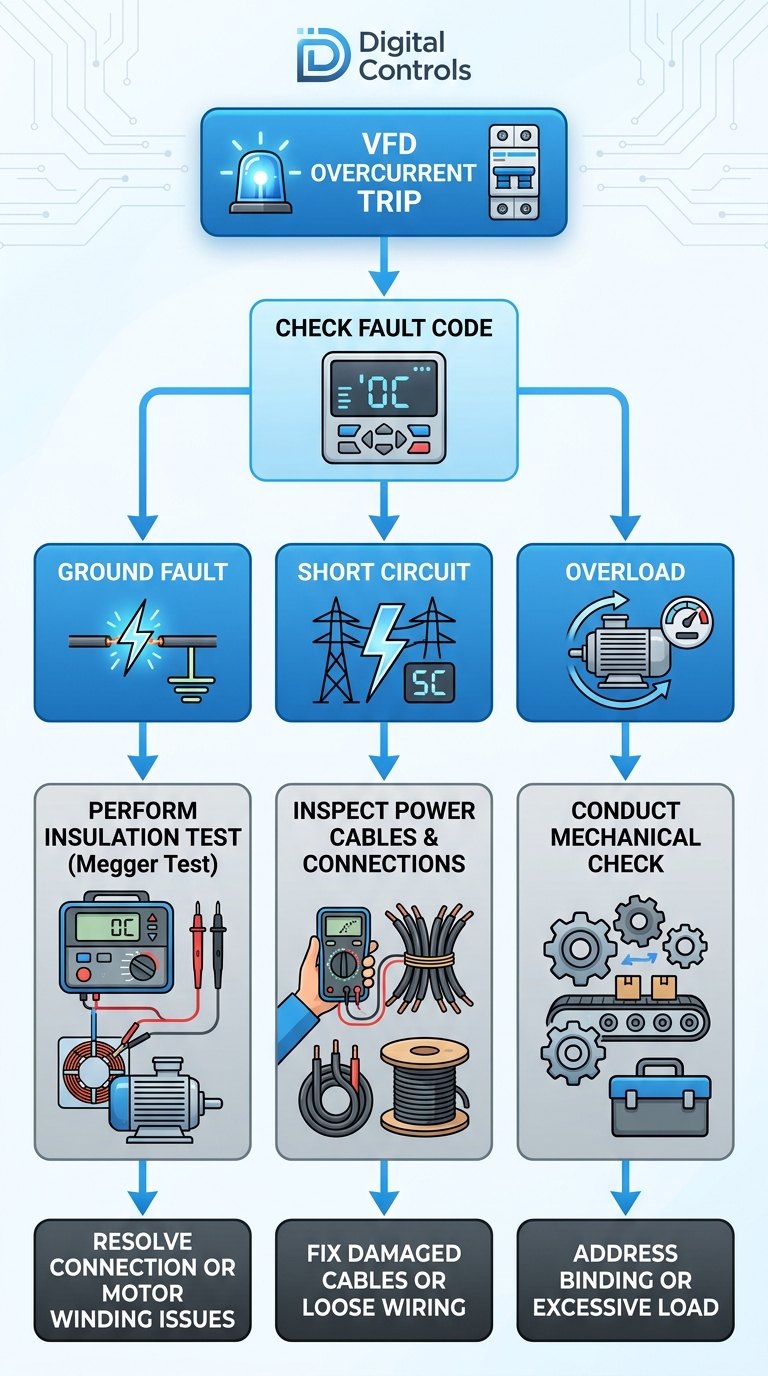
Step-by-Step Troubleshooting Flowchart
Follow this systematic approach every time an overcurrent fault occurs:
- Record the fault code and timestamp from the drive log.
- Visually inspect motor, cables, and driven machine for obvious damage or jam.
- Isolate the motor from the drive and run a no-load test (if safe).
- Measure insulation resistance and phase resistance.
- Review drive parameters: motor data, ramp times, current limits.
- Check ambient conditions – temperature, panel ventilation, mounting.
- If all clear, consider drive internal failure – blown IGBT, damaged current sensor.
For complex cases, our team at Digital Controls provides commissioning support to identify hidden issues.
Prevention: Best Practices for Indian Manufacturing Sites
Regular Maintenance with Fluke Instruments
- Once per quarter: Motor insulation test (1 kV for 480V systems).
- Monthly: Thermal imaging of drive heatsink and panel.
- After any fault: Capture current waveform with Fluke 438-II.
Proper Drive Selection and Sizing
Undersizing is the most common preventable cause. Use ABB’s digital-first drive selector to input application type (pump, fan, conveyor, crusher) and duty cycle. The tool recommends the correct ACS180, ACS380, ACS580, or ACS880 drive from the standardized family.
Parameter Settings Checklist
- Enable torque boost only when necessary.
- Set motor rated current correctly.
- Enable flying start for rotating loads.
- Use slip compensation to avoid current surge at load changes.
For control panel coordination, see our LV switchgear solutions for proper breaker coordination.
When to Replace the Drive vs. Fix the System
Not every overcurrent fault means the drive is bad. In fact, 70% of drives returned under warranty are found to be healthy when tested in Digital Controls’ lab. The real issue is often external.
But if you’ve eliminated all external causes and the drive still trips (even on a test motor), then internal damage is likely:
- Blown IGBT modules (check for short between P and N terminals).
- Burnt current sensing resistors.
- Failed DC bus capacitors.
In such cases, replacement is faster and cheaper than repair. Our product line includes ABB AC drives with next-day delivery for most ratings in India.
FAQ
1. What is the difference between overcurrent and overload in a VFD?
Overcurrent refers to a sudden current spike (often a short circuit or ground fault) that triggers an instantaneous trip. Overload is a prolonged current above rated value, detected by thermal modeling, and often caused by mechanical overload or incorrect parameter settings.
2. Can a VFD overcurrent fault damage the motor?
Yes. While the drive trips quickly, repeated overcurrent events can stress motor insulation and cause premature failure. Use a Fluke oscilloscope to check voltage spikes at motor terminals if faults persist.
3. How do I reset an overcurrent fault on an ABB drive?
Most ABB drives reset via control panel (Fault Reset button) or digital input. However, always investigate the root cause first. Blind resets can worsen damage.
4. Why does my drive trip during acceleration but run fine at speed?
This is classic undersizing or wrong acceleration ramp. Increase ramp time or check if the load requires constant torque at low speed. An ABB drive with sensorless vector control can help.
Conclusion
Understanding what causes drive overcurrent faults is the first step toward reducing downtime and extending equipment life. From misconfigured parameters to mechanical jams, most faults are preventable with proper diagnostics and selection.
At Digital Controls, we don’t just sell drives – we provide end-to-end application review, commissioning support, and replacement guidance. Whether you need an ABB ACS580 for a chiller or a Fluke thermal imager for your maintenance team, we’re here to help.
Ready to solve your drive fault issues? Contact our engineers today at digitalcontrols.org/enquiry – we’ll review your application and recommend the right solution in 24 hours.